
-
01Find leads
Find owners. Put direct numbers first.
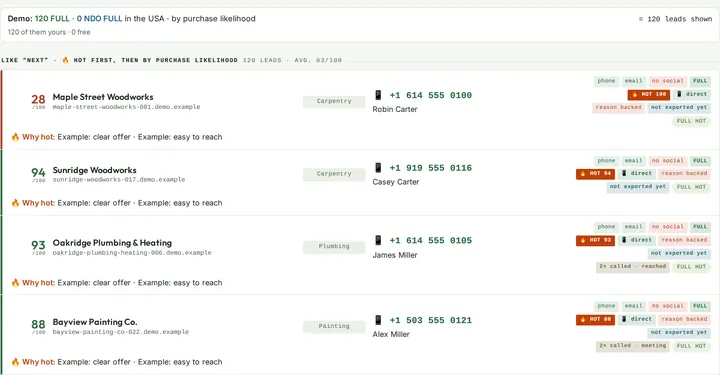
The lead machine looks for owner-run businesses by region and industry. For each one it finds the owner's name, direct number, email and website, each with a source. It recognizes mobile numbers and direct lines and puts them first. Chains, directories, dead sites and duplicates are filtered out. An algorithm uses public information to estimate the sales chance from 0 to 100, and the lead shows what the score is made of.
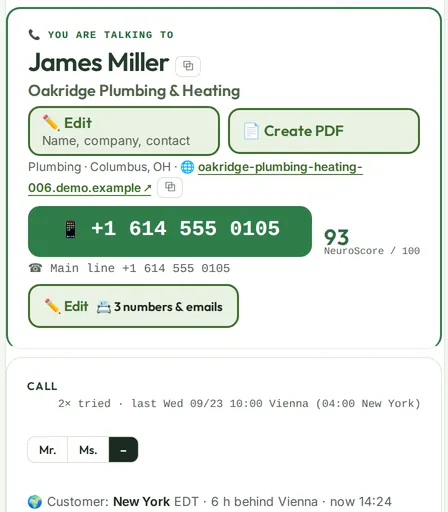
New lead · Columbus, OH · Plumbing Sample
Oakridge Plumbing & Heating
FULLMobileChecked 12 days ago
- Owner
- James Miller Contact page
- Direct number
- +1 614 555 0105 Contact page
- Website
- oakridge-plumbing-heating.example Search
- Sales chance
- 93 / 100 Algorithm
Filtered out today: 3 chains, 2 directories, 1 dead site
≤ 60days is the maximum age of a complete lead's direct number. Lumeya Call re-checks it against the website regularly.
-
02Analyze the website
A specific, documented reason to call.
The website analysis checks load time, mobile layout and contact options. The report lists findings, sources and assumptions. The full Neurowebdesign test scores up to 100 points and produces a PDF report for the owner. It doesn't measure brain activity and doesn't guarantee inquiries.
58Neurowebdesign test Sample
58 out of 100 points
PDF report ready
Revenue potential: industry figures with sources, assumptions shown
100 pointsin the Neurowebdesign test, with findings and a PDF report.
-
03Prepare the call
Know your point before you say hello.
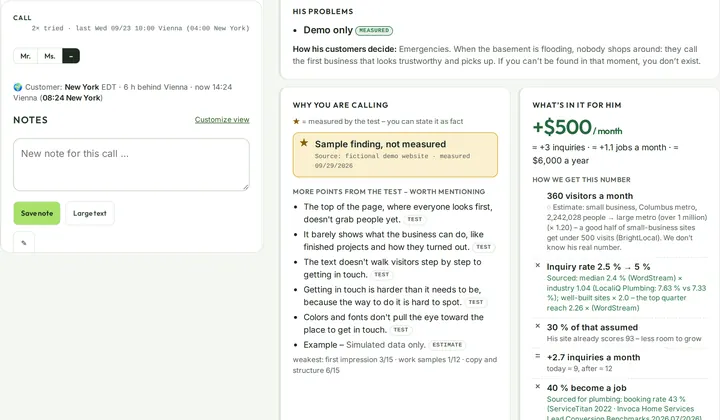
For every business, Lumeya Call writes a call guide: its problems, why you're calling, what's in it for the owner, likely objections with answers, and your opening line. The four most important points are starred. The system sets the salutation (Mr. or Ms.) itself when the first name is unambiguous. Times show in the owner's time zone and yours.
Call guide · Mr. Miller Sample
- Emergency number isn’t tap-to-call
- 5.8-second mobile load time
- No bathroom remodel inquiry form
- No visitor tracking detected
“Hello, Mr. Miller. I was looking at your website on my phone…”
What’s in it for him: sample calculation, plumbing in a rural market
4 most important points per lead. Start with these.
-
04Make the call
Keep the conversation in one place.
The call guide stays open until you close it, and you take notes as you talk. When a lead calls back, the Android app shows their card as a pop-up while the phone is ringing. On iPhone, contact sync shows who's calling. “No answer” leads stay on your list and come back at the right time for a callback.
Incoming call · Recognized Sample
Ms. Hayes
Hayes Landscaping · Callback Thu 10:00 (Berlin time)
Note: Maintenance contracts matter to her. Prefers morning calls.
-
05Follow up
“Send me something.” Now you can.
Send the proposal or the analysis PDF straight from the lead. After that, three follow-up emails from your own mailbox go out, each written for that business. They only send on weekdays during business hours, with a gradual ramp-up and daily limits to protect your domain. A reply or a decline stops them right away.
Sequence · Bennett Painting Co. Sample
- Email 1 · Report and summary
- Email 2 · Waiting for weekday business hours
- Email 3 · Final follow-up
Inbox: “Thanks, not interested” → Sequence stopped automatically
3 emailsThen Lumeya Call stops.
-
06Book & propose
Book the meeting. Send the proposal.
Book a qualifying call, a demo or a sales meeting straight from the lead. Before qualifying calls, reminder emails go out the day before and 30 minutes ahead. Each user connects their own Google Calendar, and meetings get a Google Meet or Jitsi link. Pick the PDF proposal by type and send it in your own design.
Team calendar · Wednesday Sample
10:00Qualifying call (phone) · Walker & Son ElectricReminder the day before and 30 min ahead14:00Demo · Oakridge Plumbing & Heating · Google MeetIn Google Calendar“Website redesign” proposal · PDF with your branding
For web designers and agencies who win clients by phone
 Lumeya Call:
Call the owner first,
not the front desk.
Lumeya Call is a complete cold calling machine. It finds owner-run businesses with a direct number, estimates the sales chance, analyzes their website and writes your call guide. You buy the software once and run it on your own hardware, with no subscription.
Oakridge Plumbing & HeatingMr. Miller · +1 614 555 0105
93/100
Sample

- Yours to keep: own hardware, no subscription
- A documented source for every detail
- Luminant Mind e.U., Vienna, Austria
What a lead looks like
Sample dataOakridge Plumbing & Heating
Columbus, OH · Owner-operated
Lead found01 / 04
Not the front desk.
The owner.
- Owner
- Mr. Miller
- Direct number
- +1 614 555 0105
- Sales chance
- 93 / 100
- Source
- Contact page · oakridge-plumbing-heating.example
Checked 12 days ago · ≤ 60 days
You start with the owner, a direct number and a source you can check.
Website analysis02 / 04
A specific reason to call.
Website score: 58 out of 10058
Neurowebdesign test3 findings for your call
- Emergency number isn’t tap-to-call
- 5.8-second mobile load time
- No clear contact action above the fold
You see specific website friction points you can discuss with the owner.
Guide ready03 / 04
Your opening is already there.
“Mr. Miller, I noticed your emergency number isn’t tap-to-call on mobile.”
Top 4 · Conversation starters
- Make emergency service easier to reach
- Reduce mobile load time
- Make the contact action stand out
- Ask which customers matter most
You get a personal opening and the four most important talking points, ranked by weight.
Call04 / 04
Now focus on the conversation.
Mr. Miller
00:00
Simulated call · not connected
Record the outcome
Choose a sample outcome.
You go into the conversation prepared and capture the next step right away.
From the first lead to a prepared conversation.
Sound familiar?
The work starts long before you dial.
You blocked off the morning to find clients. You’ve found a business. Now you need the owner’s name, the right number, and a look at their site on your phone. You finally call and reach the front desk: “What’s this about? The owner’s out on a job.”
- 01
Before: researching instead of calling
The owner, the number and the website are scattered across five tabs. Half an hour can disappear before you dial.
- 02
During: the front desk, not the owner
The main number gets you the office. You explain why you’re calling, and the owner may never hear about it.
- 03
After: scraps of paper, not a system
Your notes are in a document. The callback is in your head. The proposal you promised still isn’t sent.
Time spent researching is time you’re not talking to prospects. And without a specific reason to call, you sound like every other web designer.
What waiting costs
- The same research every week. Hours times your hourly rate is money you pay every month, even if no invoice ever arrives for it.
- Every call without a reason. If you don’t know the owner and haven’t seen the website, you sound like the next sales call.
- Every callback from memory. What only sits on a note gets done later, or not at all.
You handle the conversation. Lumeya Call handles the prep for each lead, before you dial. Try it below:
See how it works
One lead, one click, and you’re prepared.
Walk through a prepared call in three steps. Everything here is simulated: no one is called and no email is sent.
Call workspace
Sample data: fictional businesses
- 1Choose a lead
- 2Read the call guide
- 3Try a call & choose an outcome
Your workspace, set up for your regions, industries and team.
Request a demo
No obligation. In the demo we show you the real workspace.
Real software · Sample data
The real workspace in 100 seconds.
Lumeya CallThe real workspace in 100 secondsReal software, sample dataScreen recording of the software with invented demo businesses. No one is called. Turn on subtitles if you like.
Incoming call · mobile
James Miller
Oakridge Plumbing & Heating · from Lumeya Call
Incoming call · simulation only
Callback on iPhone: you see right away who’s calling
Contact sync adds your leads to the iPhone. When Mr. Miller calls back, his name and company show on the screen. In the workspace, his card is ready with history, analysis and notes.
Tap “Answer” to open the lead card.
Silent, local product simulation. It never places a real call; the business and every entry are fictional.
How Lumeya Call works
What Lumeya Call does before you pick up the phone.
Six steps in one system. Every detail shows its source and what comes next.
Public contact details are not consent to marketing. Check the calling and email rules that apply to you before contacting a prospect.
Six steps, one system. See them in the real workspace.
After the conversation
Everything after “Sure, send it over.”
Proposals, invoices, meetings, follow-ups, call recordings, team and devices in one workspace.
Proposals & invoices
Choose the proposal. Send the PDF while you’re still talking.
Proposal · New website
For Oakridge Plumbing & Heating · Attn: Mr. Miller
- Planning & site structure
- Copy written to sell
- Build & launch
Your logo, your colors, your prices Sample
Invoices come in the same style, with your logo and your company details.
Meetings
Qualifying call, demo, sales meeting: booked straight from the lead.
- Tue 11:00Qualifying call (phone)Reminder the day before
- Wed 14:00Demo via Google MeetIn Google Calendar
- Thu 09:30Sales meeting via JitsiConfirmed
Each user has their own Google Calendar. Before qualifying calls, reminder emails go out the day before and 30 minutes ahead.
Follow-up
Three emails from your mailbox. A reply stops them.
- Email 1
- Email 2
- Email 3
Inbox: “Thanks, not interested” → Sequence stopped Sample
- Written for each business
- Weekdays only, during business hours, with daily limits
- Replies land in the shared inbox
Statistics
Calls, reach rate and meetings, per caller.
- 312Calls
- 41 %Reach rate
- 14Meetings
Sample values Invented numbers. This is what the overview looks like, not what you will achieve.
Team
Separate accounts with roles. And a login log.
- Annatoday 08:58 · 42 minVienna · iPhone
- Benyesterday 17:12 · 1 h 05 minGraz · PC
- Roles for admins and users
- Each user sees only their own leads
- Admins see who logged in, when and from where
Devices
PC, tablet, iPhone and Android: one status, live.
Tap an outcome on your phone and your PC and tablet follow. When a lead calls back, the Android app shows their card as a pop-up; on iPhone, contact sync helps.
PC
Oakridge Plumbing & Heating
Open
iPad
Oakridge Plumbing & Heating
Open
iPhone
Oakridge Plumbing & Heating
Open
Android
Oakridge Plumbing & Heating
Open
Calls & recordings New
You make the call. Transcript and coaching land in the lead.
The companion app Lumeya Call Helper for Android records both sides of the conversation, without speakerphone and without an automatic announcement. You only need this one app: you enable the phone line in the app itself, then pair it once with Lumeya Call. If you want, your organization’s admin turns on automatic recording.
- Transcript with separate speakers: you and the other person
- Summary and AI coaching right in the lead under “Calls & recordings”
- Recordings without a match are assigned to the right lead in the Today tab
- Nothing is deleted automatically. Only your organization’s admin can delete.
Good to know: recording runs on Android. On iPhone, an announcement is audible. Whether you may record a call depends on the country; ask the other person first.
Calls & recordings · Oakridge Plumbing & HeatingSample
- YouGood morning, Mr. Miller. I had a look at your website.
- Other partyIt’s getting old, yes. What did you notice?
- YouOn mobile, the phone number is missing right at the top.
Summary
Interested in a new website, would like a proposal by email.
Coaching
Good question to open with. Next time, suggest the meeting earlier.
A sample morning
Tuesday, 9:12 a.m. Your calling block starts, and the context is already there.
Open the list
Businesses with a direct number and a high sales chance are on top, with owner, source and analysis next to them.
Call, with the guide
The four most important points are starred, the salutation is right, and you take notes live.
“Send me something.”
The analysis PDF goes out from your mailbox, and the follow-up emails are scheduled.
Qualifying call in the calendar
The reminder emails the day before and 30 minutes ahead run on their own.
Someone calls back while you’re out
On your Android phone, their card appears: who it is and what you talked about.
What does it do for you?
Run your outreach with your own numbers.
The calculation links calls, meeting rate, close rate and project value. It does not measure any effect of Lumeya Call. It shows what your own outreach numbers mean.
Purchase · White label · Beta rental
Buy once. Lumeya Call is yours.
When you buy, we set up Lumeya Call on your own hardware, under your own brand if you like. You pay no subscription and have no quotas. We quote the price after a short call, because it depends on the number of users, hardware and support.
Purchase as your own installation
Your software, your brand, your hardware.
As the owner, you run Lumeya Call yourself. There is no monthly quota: leads and website analyses run as much as your hardware can handle. As a white label, proposals, invoices, analysis PDFs and emails carry your name and logo.
Purchase / white label · Price on request
- Buy once, no subscription. We agree updates and support with you.
- White label. Your prospects see your company as the sender.
- Runs on your infrastructure. The system still needs internet for website lookups, email and calendar.
- Capacity as needed. More computing power means more throughput. We check the technical setup with you beforehand.
- Often cheaper than renting if you use it heavily over time. We work through the numbers openly with you.
Ask for the purchase price
No obligation. You get a clear view of whether buying or beta rental suits you better. Hardware is not included.
Prefer to rent first? The beta has few spots.
We rent Lumeya Call in a limited beta. Choose how many of you make calls and how many new leads each person gets per month. 30 Neurowebdesign tests are included per 100 leads, and all features are included.
€45–85 per user per month, billed monthly€36–68 billed annually · net
Users
- User 1€45 / month
30 Neurowebdesign tests per month included
- User 2€45 / month
30 Neurowebdesign tests per month included
Total for your selection
€110 / month
billed monthly, net
- 400 new leads per month
- 120 Neurowebdesign tests per month
- All features, beta setup together with you
Request beta rental
No obligation. We carry your selection over into the form.
- For business customers only.
- All prices net, plus VAT.
- Annual payment in advance; leads and tests still arrive monthly.
- Automatic website check for every complete lead; the full Neurowebdesign test with score and PDF within the stated quota.
- Telephony, phone numbers and your email mailboxes are not included.
- No automatic extra charges; unused monthly quotas expire.
- More than 10 users or more than 800 leads per user: talk to us.
Cost comparison of your selection. Not a feature comparison.
Pick the individual tools whose costs you want to compare, and enter your own prices if you like. A sample selection, not a like-for-like comparison: features, quotas and payment terms differ.
Your tool selection–
Lumeya Call–
Same number of users as above, Lumeya billed monthly. Not a like-for-like comparison: quotas and features differ.
Prices as of Sep 29, 2026. Net list prices from the vendors’ pricing pages: Close, Lusha, Instantly, Calendly. USD converted at the ECB reference rate of Sep 29, 2026 (1 EUR = 1.1355 USD). ² For 1 user, Close Solo ($19 = €16.73, 1 user only); from 2 users, Close Essentials ($49 = €43.15), monthly plans. ³ Lusha Starter: only the price on annual billing was recorded ($37.45). Instantly Growth ($47) and Calendly Standard ($12): monthly plans. Telephony, phone numbers, extra credits and integrations are not included. The tools named have their own strengths and in part broader features; Lusha credits are not the same as leads.

Who’s behind it
Built by a web design agency that sells by phone itself.
Lumeya Call comes from Luminant Mind e.U. in Vienna. We are a web design agency and win our own clients by phone. Doing that, we saw how much time the prep before a call eats up: finding the owner, checking the number, looking at the website.
So we built the system we make our own calls with. It is our own workspace, and we guide every setup personally. That is why we take on only a few teams at a time.
What runs today: We use every feature shown in our own workspace. Caller recognition is available in the Android app and, on iPhone, through contact sync. We enable the Google Calendar connection per user.
What you can check for yourself today
- Video: 100 seconds in the real workspace, with subtitles.
- Every detail about a lead carries its source and the date it was checked.
- Prices of the comparison tools with date and a link to the vendor’s page.
- Company in the commercial register: FN 665878 h, Commercial Court of Vienna.
Company: Lumeya is a brand of Luminant Mind e.U., Johannagasse 29-35/14/5, 1050 Vienna, Austria · Company registration FN 665878 h, Commercial Court of Vienna · VAT ID ATU83598858 · office@luminantmind.com · Imprint
Questions
What to know before you reach out.
Straight answers before you reach out.
What is Lumeya Call?
Lumeya Call is cold calling software for web designers and agencies who win clients by phone. A lead machine finds owner-run businesses with the owner's name, direct number, email and website, each with a source. An algorithm estimates the sales chance from 0 to 100 based on public information. The website analysis checks load time, mobile layout and contact options. The report lists findings, sources and assumptions. For every business, Lumeya Call writes a call guide. After the call, you send the proposal or the analysis PDF and book a qualifying call, demo or sales meeting, and three follow-up emails go out from your own mailbox. Lumeya Call is made by Luminant Mind e.U. in Vienna, Austria. You buy it once and run it on your own hardware, under your own brand if you want.
How much does Lumeya Call cost?
You buy Lumeya Call as your own installation, as white label if you like. We quote the price after a short call, because it depends on the number of users, your hardware and support; there's no subscription when you buy. If you'd rather rent first: in the limited beta, rental costs between €45 (100 new leads) and €85 (800 new leads) per user per month, net plus VAT. With annual billing you save 20 %, from €36 per user per month. See purchase and pricing
What does white label mean here?
You sell and call under your own name. Proposals, invoices and analysis PDFs carry your logo and company details, and emails go out from your mailbox with your signature. To your prospects, you are the sender.
Does Lumeya Call run on my own hardware?
Yes, when you buy it. We set up Lumeya Call on your computer or server and check with you beforehand how much power you need. Leads and analyses then run without a quota. The system still needs internet access for website checks, email and calendar.
How is the sales chance calculated?
An algorithm scores public information from 0 to 100. The biggest factor is how much the website could improve, followed by how reachable the owner is, the likely project value and how complete the data is. That shows you why a business is at the top. The score doesn't guarantee a deal.
How does the analysis calculate revenue potential?
With industry figures from public sources, each with its source and date. It marks whether a figure is sourced or estimated, and the calculation steps are visible, so the owner can follow every number. It isn't a forecast of their revenue.
What's the difference between a website check and a Neurowebdesign test?
Every complete lead gets an automated website check covering load time, mobile layout, contact options and visitor tracking. That gives you a documented reason to call. The full Neurowebdesign test adds a 100-point assessment, findings, a score and a PDF report for the owner. There's no quota when you buy; the beta rental includes 30 full tests per 100 leads.
Where does the business information come from?
From the businesses' own websites, especially their imprint and contact pages. Each detail has a documented source. Lumeya Call re-checks direct numbers against the website regularly; for complete leads, the number is no more than 60 days old. Chains, directories, dead sites and duplicates are filtered out.
Will I actually reach the owner?
Lumeya Call identifies owner mobile numbers and direct office lines and puts them first. No one can guarantee that someone picks up, but you no longer start by calling the front desk.
Can I call or email every business I find?
Not automatically. A publicly listed number or email address is not blanket permission to market to someone; rules apply in B2B too, and they differ between Austria and Germany. Lumeya Call documents sources and reasons to call, but it does not replace legal advice. Check beforehand whether and how you may contact a business.
Which email address sends the follow-ups?
Your own mailbox. Lumeya Call writes the three emails for each business. They only go out on weekdays during business hours, with a gradual ramp-up and daily limits. Replies land in the shared inbox, and a reply or a decline stops the sequence. No one can guarantee delivery.
Which devices can I use?
Desktop, tablet, iPhone and Android phone, all at once and in sync, including notes and callbacks. The Android app shows the lead's card as a pop-up when they call back. On iPhone, contact sync shows who's calling.
Which calendar and video tools work?
Each user connects their own Google Calendar. Meetings get a Google Meet link, or a Jitsi link without Google. We set up the Google connection for each user during onboarding.
What isn't included in the price?
Telephony costs and phone numbers, your own email mailboxes, and hardware when you buy. Lumeya Call is for business customers only.
What does beta mean for Lumeya Call?
Beta applies to the rental. We rent Lumeya Call to only a few teams, set everything up together and build their feedback straight in. Features may still change during this phase. We put the term and cancellation in writing before you start.
Request a demo or the purchase price
See Lumeya Call in a demo.
Tell us briefly who you are. We get back to you personally, show you the workspace and work out whether purchase, white label or beta rental fits your team.
- Purchase as your own installation, also as white label. We quote the price after the call.
- Prefer to rent first? Beta rental from €36 per user per month net on annual billing (from €45 billed monthly), few spots.
- We only use your details for your inquiry. No newsletter.
Prefer to go direct?
office@luminantmind.comLuminant Mind e.U. · Johannagasse 29-35/14/5 · 1050 Vienna, Austria